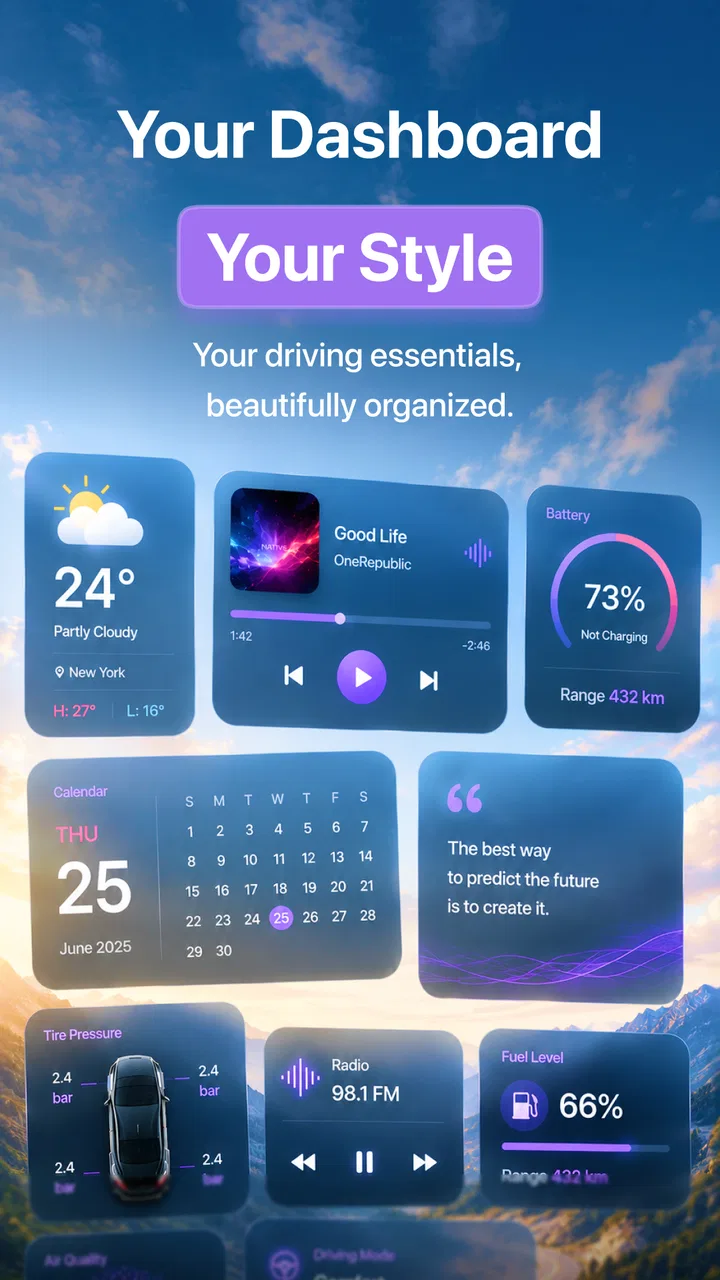
CarSole: Car Dashboard
- 4.4
- Rating
- 50.00K
- Installs
- Free
- Price

 Analysis by App-foxy
When I tried CarSole: Car Dashboard, I approached it with a very ordinary problem: I wanted a cleaner way to handle media and audio controls while driving, without constantly moving between unrelated phone screens. CarSole is a free personalization app from Mor Tosbaa Mobile that focuses on turning that situation into a more deliberate in-car experience. Its purpose is narrow, but that is also what makes it easy to understand.
The app has a 4.4 average from around six thousand ratings and has passed fifty thousand installs. Those figures suggest that it has found a useful audience without pretending to be a complete replacement for every driving tool. I see it more as a focused dashboard layer for people who want their entertainment controls arranged around the drive, rather than as a full navigation, vehicle-diagnostics, or communication suite.
From a messy phone screen to a more usable driving routine
I’ll look at how CarSole can make a cluttered phone routine feel more deliberate, especially when the goal is to reach audio controls without turning the car into a place for browsing. The key is to decide what belongs on the dashboard and what is better handled before setting off. That distinction leads naturally to the practical question of how to prepare for a drive.
You May Also Like

 Blood Strike: 2.5 Anniversary
Blood Strike’s Loadouts Turn Every Drop Into a Tactical Gamble
A close look at Blood Strike’s custom loadouts: how fast access to signature weapons reshapes its battle royale rhythm, rewards preparation, and narrows the gap between fights.

 Pandora - Music & Podcasts
Pandora’s Music Is Easy to Start, but Harder to Recover
Pandora’s strength is its low-effort path from a seed to a station. Its weak spot is how much confidence it asks you to place in connection, setup, and quiet recovery.

 8 Ball Pool
8 Ball Pool Is Built on Rivalries, Rematches, and Routine
A close look at the rivalries, rematches, shared routines, and unanswered safety questions that turn a quick pool match into a persistent mobile community.

 Samsung Music
Samsung Music’s Quiet Strength Is Playing What You Already Own
Its reach comes less from spectacle than from dependable access to a personal library. That simplicity is both the app’s strongest retention engine and its ceiling.

 AccuWeather: Weather Radar
AccuWeather Review: A Quick, Clear Forecast for Everyday Decisions
For everyday plans, the best forecast is the one you can understand quickly. AccuWeather makes rain timing, radar, and local conditions easy to act on, with a few trade-offs.

 Hill Climb Racing
Why Hill Climb Racing Still Turns Crashes Into One More Run
A tiny car, a bumpy hill and one more upgrade: Hill Climb Racing keeps resurfacing because its simple chaos makes every near-miss feel personal.
More From Our News Desk



Starting with the real driving problem
My starting condition was familiar: audio was already part of the journey, but controlling it involved too much visual searching. A normal music app may be excellent when I am sitting still, yet its layout is not always the most comfortable thing to glance at from the driver’s seat. A car stereo may handle basic playback, but the phone remains the source of the media and often becomes the place where interruptions, track changes, and volume decisions happen.
CarSole makes sense in that gap. Instead of asking me to treat the phone like a miniature desktop, it presents itself as a driving-oriented interface for media playback and audio controls. That distinction matters. I would not install it expecting a new music library or a replacement for a navigation service. I would install it to reduce the distance between starting a drive and reaching the controls I use during that drive.
The first useful decision is to define what I want the app to do before opening it. If the goal is simply to play one album and never touch the phone, the regular music app may already be enough. If I regularly switch between audio sources, adjust playback, or want a dedicated dashboard context, CarSole has a clearer reason to exist. This is one of its less obvious strengths: it encourages a separate driving workflow instead of mixing driving controls with every other phone activity.
Preparing the phone before moving
I would set up the experience while parked, not at the curb after the engine has started. That means choosing the audio I expect to use, checking that the phone is connected to the car in the way I normally use it, and opening CarSole before the journey begins. This preparation is more important than it sounds because a dashboard interface can only simplify the final step; it cannot remove every dependency between the phone, the car, and the media source.
The app is available at no purchase cost, which makes this trial relatively easy. It is suitable for Everyone, and the minimum operating-system requirement is Android 7.0 or later. Those details make it approachable for people who are not using a recent flagship phone, although compatibility in a real vehicle still depends on the rest of the setup. A free download lowers the barrier, but it does not guarantee that every phone-and-car combination will behave identically.
There are in-app purchases ranging from under a dollar to nearly forty dollars per item. I would therefore begin with the free experience and decide only after using it in the exact routine I care about. For a dashboard tool, the important test is not whether it looks interesting for five minutes; it is whether it saves attention during repeated trips. Paying before that test would be the wrong order of operations.
Following the step-by-step flow
My practical flow starts with audio selection outside the moving car. I choose the playlist, podcast, or other media in the source app, then move into CarSole for the driving portion. This handoff is a useful habit because it keeps discovery and browsing separate from the controls I need once the journey is underway. It also exposes a trade-off: CarSole can organize the driving interaction, but it does not turn every media source into one universal library.
Once the dashboard is open, I treat it as a control surface rather than a place to explore. I look for the action I need, make the change, and return my attention to the road. That sounds basic, but it is the central test for this kind of app. A dashboard succeeds when it shortens a decision, not when it gives me more screens to inspect.
For a typical morning commute, I might start a podcast before leaving, open CarSole, and use it only when I need to manage playback. If a song or episode is not right for the moment, I make the change through the driving-oriented controls rather than unlocking the phone and wandering through the source application. The result is not a dramatic transformation; it is a series of small reductions in friction that become more valuable when repeated every day.
A less obvious tip is to judge the app by the number of times it prevents a full phone interaction, not by the number of controls it displays. More buttons are not automatically better in a car. I prefer a workflow where I already know the next action before looking down. If the interface makes me pause to interpret it, the supposed convenience starts working against safe driving habits.
Handling the handoffs between phone, car, and media
The most important handoff is between the media source and the dashboard. CarSole sits in the middle of that routine: the source provides the content, the app provides the driving context, and the car provides the listening environment. Thinking about those roles helps explain both the app’s usefulness and its boundaries. If playback begins in an unexpected place, the dashboard cannot repair the entire chain by itself.
The second handoff is between the phone and the vehicle. Some drivers will use the phone’s audio output, while others will rely on a car connection already configured for media. CarSole is most valuable when the connection is already dependable. It should not be treated as a substitute for solving pairing, output-selection, or vehicle-audio problems. Those are separate parts of the setup, and confusing them can lead to frustration.
The third handoff is between the parked setup and the moving journey. I found that the best experience depends on doing the fiddly work early: select the content, establish the connection, open the dashboard, and then leave the arrangement alone as much as possible. That workflow also gives the app a practical advantage over repeatedly launching a standard music app, because the intention is clear from the moment the dashboard is opened.
There is a human handoff too. If someone else is helping choose the next item, a dashboard-style screen may be easier to understand than a dense library view, but I would still keep that interaction brief and ideally handle it while stopped. A cleaner interface can reduce distraction, but it does not make active browsing a good driving practice.
What the result feels like in everyday use
The outcome I noticed was less about adding entertainment and more about giving the drive a starting point. CarSole helps create a boundary between “I am preparing my media” and “I am now driving.” That separation is valuable for commuters, delivery workers, and anyone who spends regular time behind the wheel and wants the same basic control routine each day.
It also works well for people who dislike the visual clutter of switching among several phone apps. A normal alternative is to use the music app directly, rely entirely on the car’s built-in controls, or use a broader driving assistant that combines navigation, calls, and media. Direct use of the music app is often better for browsing a large collection. Built-in car controls are better when they already provide everything needed. A broader assistant is preferable for someone who wants one place for maps and communication as well as audio.
CarSole occupies a narrower middle ground. Its appeal is strongest when media control is the main problem and the existing car interface feels inconvenient. I would recommend it to a driver who wants a dedicated, simpler context for audio, especially if that person is willing to prepare the content before moving. I would not recommend it merely because it is free; the value comes from matching the app to a repeated driving habit.
Another concrete insight is that the app may be most useful for short, predictable journeys rather than long trips that involve constant content discovery. On a commute, the same sequence can become automatic. On a road trip, I may need richer browsing, route planning, and information tools, where a specialized dashboard can feel incomplete. The narrower the task, the more clearly CarSole’s focused design earns its place.
Where the workflow breaks down
The first weak point is the dependency on the rest of the media chain. If the source app is not ready, the phone is connected to the wrong output, or the car does not behave as expected, CarSole cannot remove every layer of troubleshooting. That does not make the app poor, but it means the smooth experience begins before CarSole opens.
The second weak point is the temptation to overestimate what a dashboard interface can safely solve. Any app that encourages more interaction while driving deserves a cautious approach. I would never use it as a reason to browse, search, or adjust several settings in motion. The best workflow is prepared in advance, with only brief control changes during the journey.
The third issue is value for money. Because the app is free to start and includes optional purchases, different users may reach different conclusions about whether the paid items are worthwhile. I would reserve that decision for people who have already confirmed that the dashboard workflow fits their car and their preferred audio routine. Someone who uses the app occasionally may find the standard tools sufficient.
There is also a practical limitation for users seeking an all-in-one driving environment. CarSole’s identity is centered on media playback and audio controls. If my priority is turn-by-turn navigation, hands-free messaging, vehicle information, or a deeply integrated automotive system, I would choose a tool designed around those needs instead. Trying to force this app into that larger role would create disappointment rather than extra value.
Who should install it, and who should skip it?
I think CarSole is a good fit for drivers who already have a reliable audio source and want a more intentional control screen for the journey. It is especially sensible for people who repeat the same driving pattern, prefer to prepare media before leaving, and find ordinary phone interfaces too distracting or cluttered for quick playback changes.
It is less suitable for someone who expects a complete replacement for a car system. It is also not the best choice for a user whose main activity is searching through a huge collection while traveling. In that case, the original media app may offer better discovery, while the car’s own controls may be more convenient if they already handle playback cleanly.
Before deciding, I would answer three practical questions. Do I regularly need media controls during drives? Is my phone-to-car audio connection already dependable? Am I willing to prepare content while parked? If the answer to all three is yes, the app has a fair chance of improving the routine. If the answer is no, installing another layer may simply add another step.
My final take on the driving workflow
CarSole: Car Dashboard is a focused personalization app rather than a universal driving companion. Mor Tosbaa Mobile has aimed at a specific handoff: getting from media preparation to usable audio control without making the driver navigate a general-purpose phone interface. In my experience, that focus is its main reason to use it.
The current version is 18, and the app was released on June 26, 2026. Those details place it as a current option for compatible Android devices, but the real question remains practical: does its dashboard flow fit the way I start and manage a drive? I would test that with several normal journeys rather than judging it from a single glance.
My recommendation is simple: try the free version if your daily frustration is audio control during driving, prepare everything while parked, and keep the app’s role narrow. It can make the transition from phone media to in-car listening feel more organized. If what you really need is navigation, communication, or deep vehicle integration, a broader alternative will serve you better. For the right user, though, CarSole earns its place by making one common driving task easier without pretending to solve every task around it.
FAQs for CarSole: Car Dashboard
01What is CarSole: Car Dashboard, and what does it do?
CarSole: Car Dashboard is designed to turn an Android device into a simplified in-car dashboard interface. After testing its layout, the app appears focused on making frequently used functions easier to access while driving, such as navigation shortcuts, media controls, phone-related options, and vehicle information. Its usefulness depends on your phone, vehicle setup, and the permissions or connected services you choose to enable.
02Is CarSole: Car Dashboard compatible with every car and Android phone?
The app may work on many Android phones, but compatibility is not guaranteed for every device or vehicle. The experience can vary according to Android version, screen size, Bluetooth behavior, USB connections, and whether your car supports features such as Android Auto or hands-free media control. Before downloading, check the Google Play listing for supported requirements and test the app while parked before relying on it during a journey.
03Does CarSole: Car Dashboard require an internet connection?
Some dashboard functions may work without a constant internet connection, particularly basic interface elements, local media controls, and information already available on the phone. However, features involving online maps, live traffic, weather, streaming services, voice assistants, or cloud-based data generally require mobile data or Wi-Fi. Offline behavior can also differ by device, so it is wise to download maps and prepare important routes before driving outside reliable coverage.
04Is CarSole: Car Dashboard safe to use while driving?
CarSole: Car Dashboard can make a phone interface more convenient to view, but it does not remove the risks of distraction. Drivers should configure the app before starting, use a secure legal mount, keep interactions brief, and rely on voice commands whenever possible. Never type, browse, or adjust complicated settings while the vehicle is moving. Local laws and your car manufacturer’s safety guidance should always take priority.
05What permissions does CarSole: Car Dashboard need, and is my data private?
The permissions requested may depend on the features you activate and could include access to location, Bluetooth, notifications, contacts, phone functions, or media controls. These permissions can help the dashboard operate correctly, but you should review them carefully during setup and disable anything unnecessary. Read the app’s current privacy policy and Google Play data-safety information, since collection, sharing, and retention practices may change with future updates.
Pros
- Clean dashboard layout makes key driving data easy to read.
- Supports quick access to navigation
- music
- and phone controls.
- Useful for older cars without a built-in infotainment system.
- Customizable display helps prioritize the information you use most.
- Can make a spare Android phone useful as a dedicated car screen.
Cons
- Requires a secure phone mount for safe and comfortable use.
- Battery drain can be significant during long drives.
- Some features may depend on compatible phone hardware or sensors.
- A phone’s screen can be difficult to see in direct sunlight.
- Using the app while driving may be distracting if not configured beforehand.

CarSole: Car Dashboard
Gallery